PDF to Excel Conversion Guide: Extract Table Data
PDF to Excel conversion is used to convert table data in PDF to editable Excel format. This guide covers conversion methods and tips.
Last updated:
How does PDF to Excel conversion work?
PDF to Excel conversion analyzes the table structure in PDF and converts cells to Excel format. In text-based PDFs (native PDF), this process is quite successful.
In scanned PDFs (image PDF), OCR (Optical Character Recognition) is needed. OCR identifies text in the image and reconstructs the table structure.
Conversion quality depends on the PDF structure. Simple tables (single page, clean cells) convert well. Complex tables (merged cells, nested tables) may cause issues.
Conversion tips
1. Use text-based PDF. OCR errors may occur in scanned PDFs.
2. Check table structure. Merged cells may cause issues during conversion.
3. Check formulas. Calculations in PDF are transferred as values, not formulas.
Multiple pages and tables can be processed. Document-layout mode keeps content on one worksheet; separate-tables mode creates sheets for detected tables.
5. Verify output. Open the converted Excel file and verify the data.
Utilgo PDF to Excel converter
The PDF is uploaded to the server to create XLSX. Up to 30 pages are supported, with up to 10 pages requiring OCR. Compare headers, numbers and row transitions with the original; original Excel formulas cannot be recovered from PDF.
Compare a real conversion
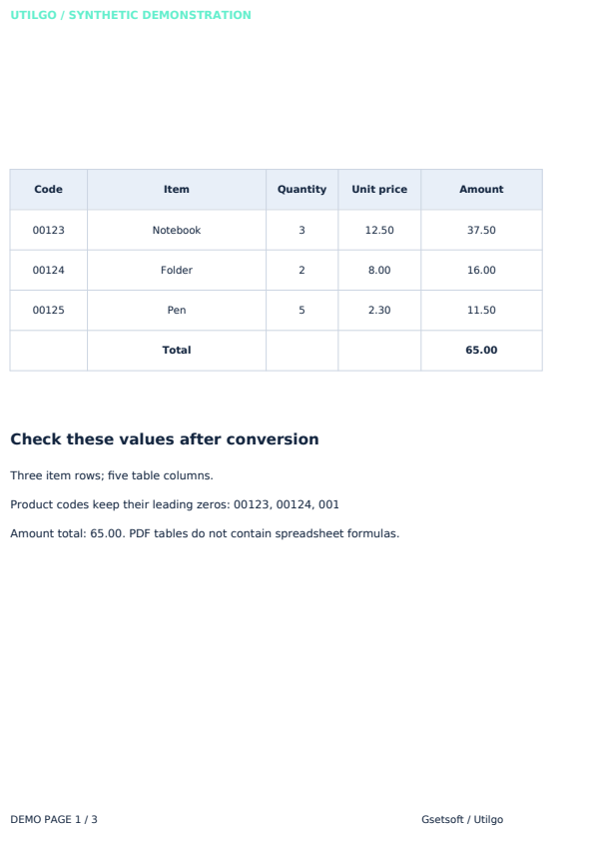
The English example below contains fictional data. The Excel file produced by the Utilgo engine retains code 00123 and total 65.00. Images are not transferred; header colours and page layout can differ from the source. This example does not guarantee the same result for your file.
Try a real example file
This document was created for demonstration and contains no customer or employee data. Download the input and actual tool output to compare them.
Example checked on:
The sample preserved code 00123 and total 65.00. Number format was set to text; formulas were not recovered. Spreadsheet cells do not reproduce the PDF’s pixel layout.
Settings used in this run
- Excel layout
- Document layout
- Table detection
- Automatic
- OCR
- Off
- Number format
- Text
- Language
- English
Checks on this example
- Worksheets
- 1
- Checked code
- 00123
- Checked total
- 65.00
- Formula cells
- 0
- Rendered pages
- 1
Only the example below was verified. Other files may produce different layouts or results; keep the original.