Adding a Draft Watermark to a PDF Without Hiding the Content
A DRAFT mark can identify a review copy of a report. It does not lock the file, prevent editing or stop recipients from exporting content. Its purpose is to add a visible status message.
Last updated:
Choose short text
Try “DRAFT — REVIEW”. Long sentences can run beyond the page or cover tables. Utilgo’s PDF tool lets you choose text, font size and angle. The mark is added centrally with fixed transparency; there is no separate opacity control.
Finish layout changes first
Complete ordering and cropping before adding the watermark. Inspect the mark on every page type, especially small pages, landscape drawings and dense tables. Reduce its size or change the angle if needed. Bigger does not always mean clearer.
Check screen and print
Zoom into footnotes, signature areas and fine lines. If sharing printed copies, print a sample page: a faint mark may look different on paper. If converting to grayscale, check readability again after the final conversion.
Name the review copy clearly
Processing runs in your browser. Keep the original and save a separate file such as report-draft.pdf. A watermark is not password protection, secure redaction or signature validation. Generate a clean final version from the original rather than repeatedly marking the already-watermarked copy.
Try a real example file
This document was created for demonstration and contains no customer or employee data. Download the input and actual tool output to compare them.
Example checked on:
Settings used in this run
- Text
- DRAFT
- Font size
- 36
- Angle
- 35
Checks on this example
- Input pages
- 3
- Output pages
- 3
- Watermark text
- DRAFT
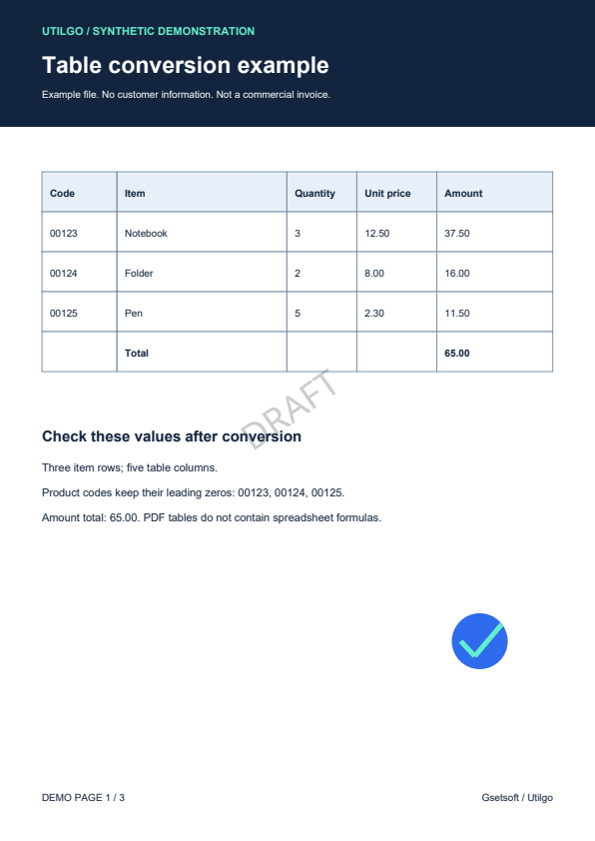
Only the example below was verified. Other files may produce different layouts or results; keep the original.